Alpaca Certification
"Intercepting an SSL request and decoding it (using OpenSSL and HTTPS requests)"
Recon
We got these files:
~/ctf/alpacahack/web/alpaca-certification
❯ tree 07:56:05
.
├── compose.yaml
├── nginx
│ ├── default.conf
│ ├── Dockerfile
│ ├── index.html
│ └── openssl.cnf
└── publickeynya.pem
2 directories, 9 filesNow let’s check the important files:
~/ctf/alpacahack/web/alpaca-certification
❯ cat nginx/default.conf 07:54:43
server {
listen 443 ssl;
root /usr/share/nginx/html;
ssl_certificate /cert/cert.pem;
ssl_certificate_key /cert/key.pem;
}~/ctf/alpacahack/web/alpaca-certification
❯ cat nginx/openssl.cnf 07:54:39
[ req ]
distinguished_name = dn
x509_extensions = v3_req
prompt = no
[ dn ]
O = Alpacahack
OU = Alpacahack
[ v3_req ]
1.2.3.4.5.6 = ASN1:UTF8String:Alpaca{REDACTED}As we can see in the output, the flag is stored at v3_req (custom) at openssl.
💡
Google: [ req ] is used for creating a new certificate (Certificate Signing Request). This section is used to define X509v3 Extensions. These extensions are typically used to add security features such as Subject Alternative Name (SAN) so that a single certificate can be used across multiple domains (e.g., *.google.com).
But in this one is used for hiding the flag.
Exploit
So in the meaning, we can get the flag after we got the cert.pem, not the key.pem. Which is kinda easy because cert.pem is not a secret, it’s like a public key. So we always get the cert.pemwhere the flag hiding in that file.
In this case, i use a command for receiving the cert.pem.
openssl s_client -connect 34.170.146.252:6521 | openssl x509 -text -nooutopenssl s_client is used so we access the website using SSL and we get the SSL request information. For the openssl x509 is used to decode the certificate (BEGIN CERTIFICATE - END CERTIFICATE).
This is the output so we got the flag:
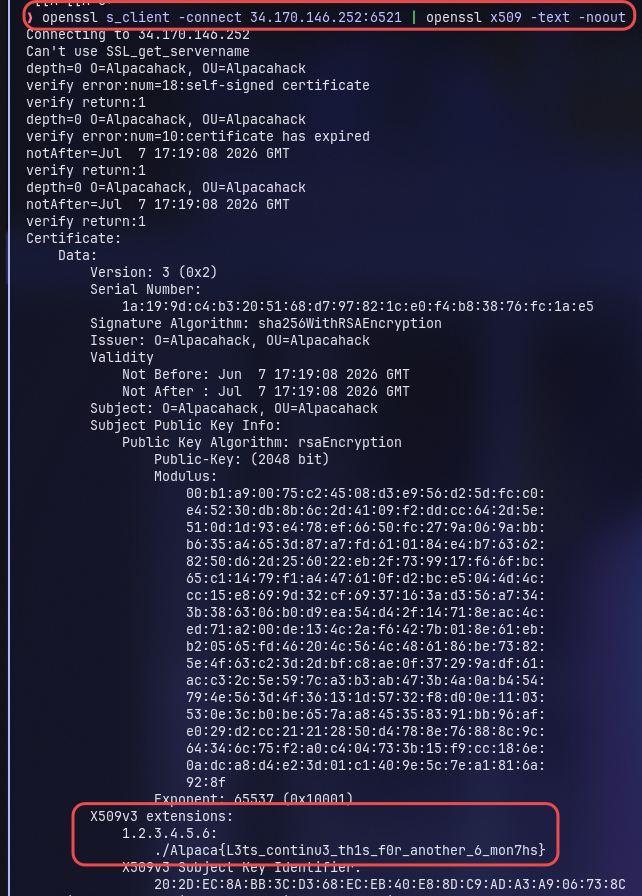
PoC request
openssl s_client -connect 34.170.146.252:6521 | openssl x509 -text -noout